

Technology moves fast. Is your strategy development process keeping pace?
Look at a cell phone from 2006. At the time, it was modern, sleek, and cutting-edge. Today? It's a dinosaur.
The same thing is happening in algorithmic trading. The tools available to retail traders have made quantum leaps in just the past few years. What once required a team of quants and programmers is now accessible to individual traders from their home offices.
So the question is: are you still building strategies the 2006 way?
For years, I’ve been building trading systems by hand. By that, I mean mastering a programming language, coding up strategies, testing them, and validating them manually. My current way of building trading systems is time-consuming. It’s easy to spend hours hand-coding indicator combinations, manually testing thousands of parameter variations, running validation tests one at a time, updating code for each new idea, and debugging syntax errors instead of actually testing trading concepts.
It’s exhausting and inefficient. My fear, of course, is that technology will change and I may fall behind. So I’m always on the lookout for potential new tools.
What if you could condense eight hours of development work into less than 60 minutes? Test thousands of strategy variations, validate them through proprietary robustness tests, and export production-ready code—without writing a single line yourself?
That’s where Build Alpha comes into the picture. I reviewed the original Build Alpha back in 2021, and you can read that here: The No-Code Solution for Generating Winning Trading Systems. Since then, I’ve integrated Build Alpha into my development process, and I’m currently trading several strategies built with it. More on that later in the article.
However, the original Build Alpha never completely replaced my process of building and validating trading systems by hand. My traditional approach involves manually writing code, testing, editing, and validating strategies—it’s a very hands-on workflow. The original Build Alpha also required a fair amount of manual input, so it never fully replaced my development process. In short, it became part of my process—another tool in my toolbox. But that may change today.
The next version of Build Alpha, version 3, was just released. Will Build Alpha 3.0 replace my development process? It’s too early to tell, but it looks like it might have the potential to do just that.
First, for those new to Build Alpha, it’s a no-code platform for creating and validating algorithmic trading systems, featuring over 5,000 built-in signals, automated validation workflows, and AI-powered portfolio optimization. Version 3.0 is a major step forward from an already solid tool.
With the newest version of Build Alpha, many of the shortcomings of the original software have been removed.
Will this be the version of Build Alpha that finally allows me to completely abandon my traditional approach of writing strategy code and validating strategies by hand?
Let’s take a deeper look.
My Two Favorite New Features
1. Automated Workflows: Validation Without the Tedium
If you looked at Build Alpha a few years ago, you need to look again. Version 3.0 introduces features that fundamentally change how you develop and validate trading systems.
This is the feature I'm most excited about, and I'll tell you why from personal experience.
I've been using Build Alpha for years. Built strategies with it. Trading several of them live right now. But the earlier versions had one real frustration: the manual labor required for validation was brutal.
Strategy generation was fast and powerful. But once Build Alpha produced hundreds of potential strategies, the real work began. Click through each strategy individually, run validation tests one at a time, manually record which ones passed which tests, track everything in spreadsheets.
Want to know which of 200 strategies pass the Noise Test? Click, wait, record, repeat — 200 times. Want to filter for strategies with profit factors above 1.5 AND out-of-sample performance within 25% of in-sample? Manual sorting, filtering, cross-referencing.
Mind-numbing work. And it created a real bottleneck. I could generate strategies quickly, but thorough validation took hours. Build Alpha 3.0 fixes this with Automated Workflows.
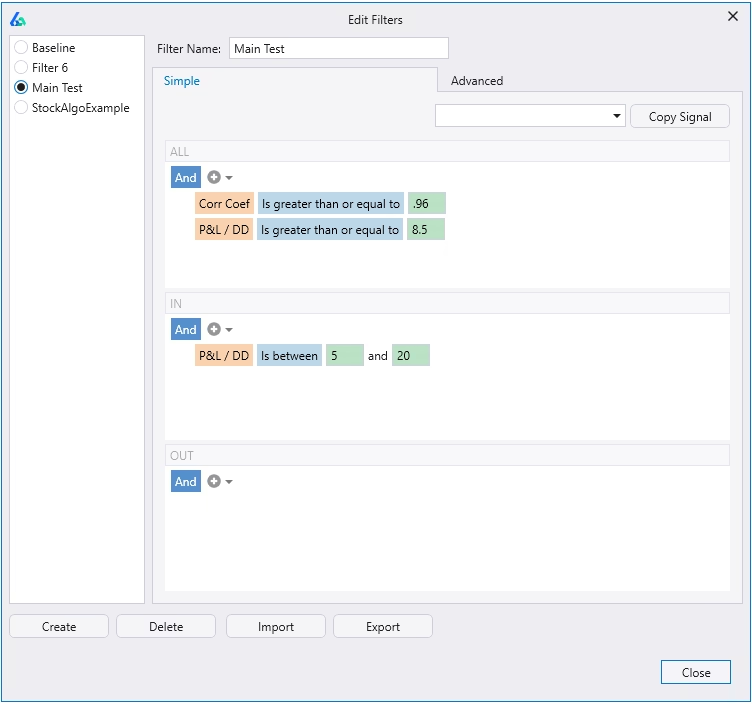
Automated Workflows
You set filters once based on performance metrics (profit factor, win rate, drawdown, trade frequency), robustness test results (Noise Test, Variance Test, Monte Carlo), or whatever combination of criteria you want. Build Alpha automatically discards anything that doesn't qualify. You only see strategies worth your time.
That bottleneck is gone. You can finally move as fast on validation as you can on generation.
2. Portfolio Suggest: AI-Powered Portfolio Construction
The second major feature is Portfolio Suggest — and it tackles a problem every strategy developer hits eventually.
Once you've built a library of validated strategies, you face a new challenge. How do you combine them into an optimal portfolio? What position sizing should each use? Which strategies complement each other? Which combinations produce the best risk-adjusted returns?
Testing every possible combination manually isn't realistic. With 20 strategies and different weightings, sizing methods, and entry/exit modes, you're looking at millions of possible portfolios.
Portfolio Suggest uses AI trained on thousands of strategies and market environments to do this work for you. One button click. Build Alpha analyzes your saved strategies and recommends optimal combinations, position sizing, entry and exit mode adjustments, and weightings that maximize Sharpe Ratio.
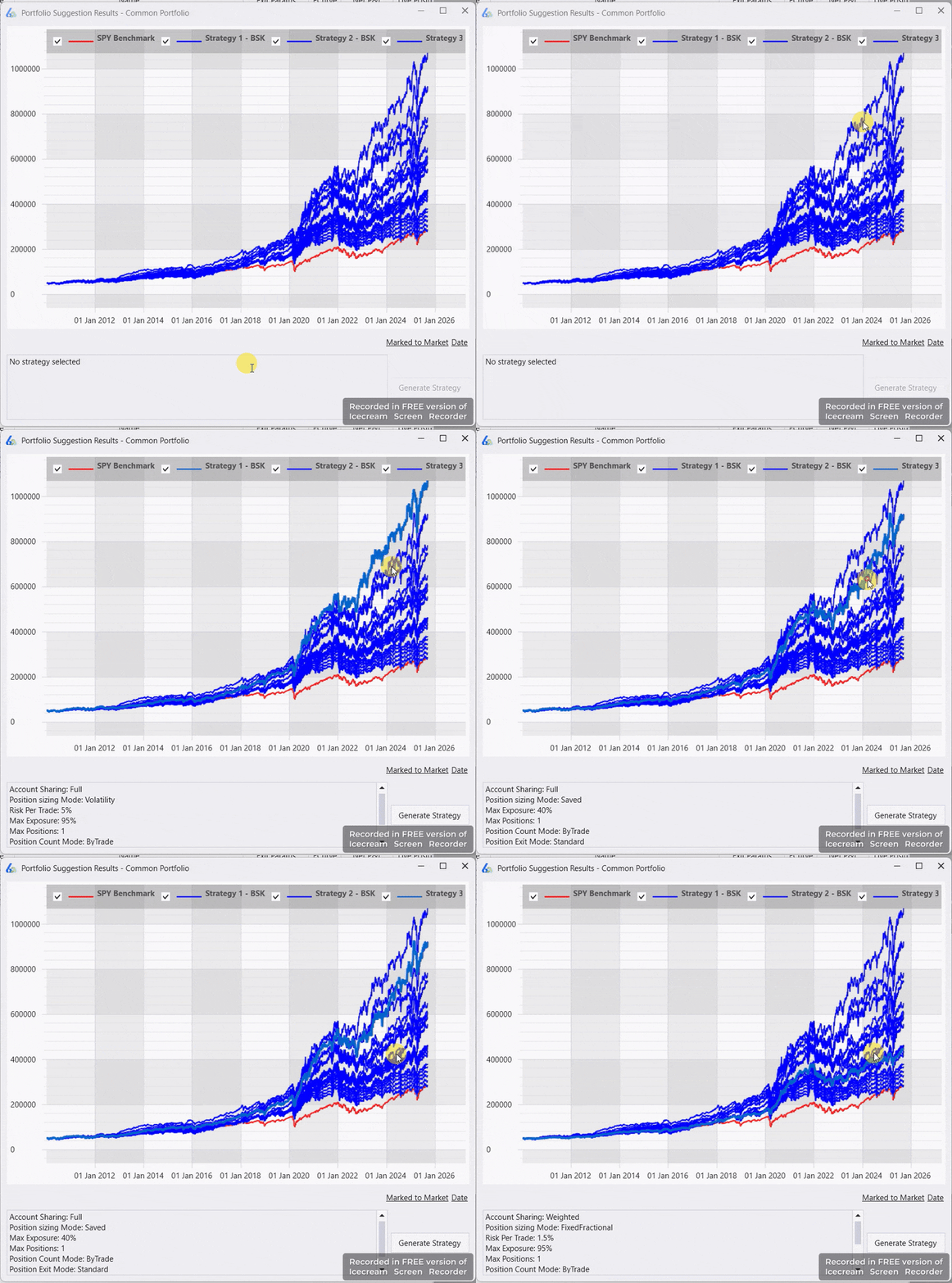
Think of it as having a portfolio manager go through your strategy library and tell you the best way to deploy capital across your systems.
Your judgment still matters — you make the final calls. But it dramatically speeds up the portfolio construction process and surfaces combinations you'd likely never test on your own.
The Core Build Alpha Workflow
Despite the new features, Build Alpha's fundamental approach hasn't changed — and that's a good thing.
1. Define Your Strategy Parameters
Pick your market (S&P 500, Crude Oil, Gold, etc.), timeframe (daily, 60-minute, 5-minute), and testing periods. Build Alpha comes loaded with 30+ futures markets, 30+ ETFs, and 30+ forex pairs with 10+ years of historical data. You can also import your own price data for any timeframe.
2. Choose Your Entry and Exit Signals
Over 5,000 pre-built signals covering classic indicators (MACD, RSI, Stochastics, ATR, Moving Averages), price patterns, market structure tools like the Hurst Exponent and Kaufman Efficiency Ratio, and alternative data including VIX term structure, Treasury yields, Dark Pool Index, Gamma Exposure, and economic data. Seasonality and calendar effects too.
You can select 2 signals or all 5,000+. Build Alpha tests the combinations.
3. Let Build Alpha Mine for Strategies
Hit simulate. The genetic algorithm engine explores tens of thousands of strategies per second — testing signal combinations, optimizing parameters, and ranking results based on whatever fitness function you choose (net profit, Sharpe Ratio, profit factor).
It also generates thousands of random strategies as a baseline so you can see whether your results reflect genuine edge or just random chance.
4. Review and Validate
Results display in a sortable output table. Arrow keys or clicks to navigate through hundreds of generated strategies. For each one you get in-sample, out-of-sample, and combined performance, equity curves with Monte Carlo projection bands, detailed metrics, and robustness test results. Automated Workflows lets you filter all of this instantly against your criteria.
5. Test Robustness
This is where Build Alpha separates itself. The proprietary validation tests aren't available anywhere else:
The Noise Test introduces slight variations to price data and re-trades the strategy 1,000 times. Strategies with real edge survive the noise. The Vs. Random test compares your strategy against thousands of randomly generated ones — if random strategies match your results, you've got curve-fitting, not edge. Variance Testing projects future performance over the next N trades with varying win rates, which sets realistic expectations and flags backtests that are too good to be true. Monte Carlo Analysis shows best, worst, and average drawdown scenarios to help you size positions. The Edge Ratio measures how far trades move in your favor versus against you over time and shows when that edge starts to decay.
6. Build Your Portfolio
Promising strategies go into Portfolio Mode. Analyze correlation between strategies, run portfolio-level validation, optimize position sizing with Mean Variance Analysis, use Portfolio Suggest to find optimal combinations, or generate a Daily Position Report for manual execution.
7. Export Production-Ready Code
One click. Build Alpha generates fully automatable code for TradeStation (EasyLanguage), MultiCharts (PowerLanguage), NinjaTrader 8, TradingView, MetaTrader 4 & 5, Interactive Brokers, Python, and ProRealTime.
No coding required. Copy, paste, and you're ready to test on a sim account or go live.
What Type of Strategies Can You Build?
One of Build Alpha's most impressive qualities is the sheer variety of strategy types it can generate. This isn't just a tool for building simple moving average crossovers. Build Alpha can construct sophisticated, institutional-grade systems that most retail traders have never attempted.
Standard Long/Short Strategies
The foundation. Build Alpha can build standard directional strategies on any market and timeframe — daily, 60-minute, 5-minute, or custom imported data. Long-only, short-only, or both. This is where most traders start, and Build Alpha handles it exceptionally well.
Multi-Symbol Strategies
Instead of building a system on a single market, Build Alpha can search for strategies across several symbols simultaneously. Rather than just testing the S&P 500, you can have Build Alpha evaluate signals across the S&P 500, NASDAQ, and Dow at once — finding indicator combinations and parameter values that hold up across all three markets. It's a powerful way to avoid curve-fitting to one instrument's quirks.
Multi-Timeframe Strategies
Build Alpha can construct signals that span multiple timeframes. Build a 30-minute strategy that only takes trades when the daily chart confirms the signal. This type of filter adds a layer of robustness that single-timeframe systems often lack.
Intermarket Strategies
Build Alpha lets you incorporate a second and third market as filter signals. Build an S&P 500 system that only takes long trades when Gold is above its 30-day moving average and US Bonds are below their 200-day moving average, for example. Intermarket relationships have historically provided edge that single-market analysis misses entirely.
Ensemble Strategies
These are meta-strategies that use other strategies as input signals — essentially a voting system across your portfolio. If you have five Crude Oil strategies, you might only take a position when three of the five agree. Build Alpha tests different agreement thresholds to find the optimal setup. Ensemble approaches are widely regarded as superior to individual model predictions across machine learning and data science, and the same principle applies to trading systems.
Rebalance Strategies
Rank a universe of symbols and apply your strategy only to the top (or bottom) ranked instruments. Trade the top 5 Dow 30 stocks each month based on prior month performance, rebalancing at the start of each new month. Build Alpha automatically tests the best ranking method, rebalance period, and number of symbols to include.
Regime Switching Models
Most strategies just go flat when there's no signal — capital sitting idle. Build Alpha lets you park that capital somewhere else instead. Go long S&P 500 during bullish regimes, then automatically rotate into long US 10-Year Notes when conditions turn bearish. This has real potential to improve overall portfolio returns by putting idle capital to work. No other retail platform I'm aware of lets you build and test market regime switching strategies this way.
Advanced Capabilities That Set Build Alpha Apart
Beyond strategy types, Build Alpha 3.0 includes features that give individual traders capabilities previously reserved for institutional quant teams.
Intelligence Report
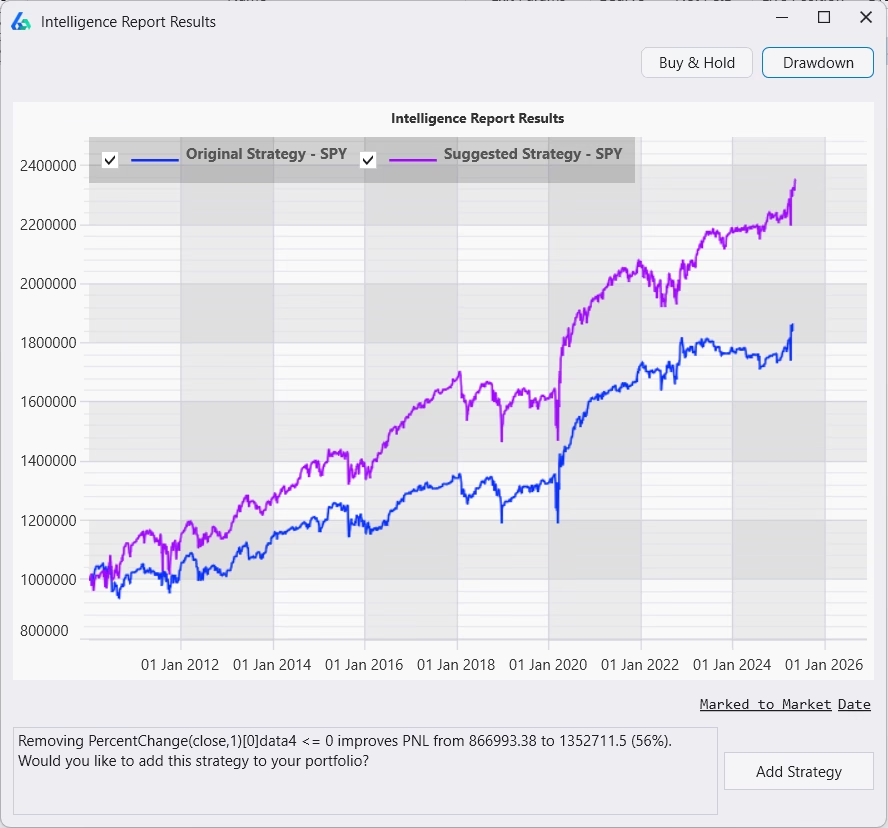
Build Alpha reviews your entire library of saved strategies and automatically suggests improvements. An IR icon appears next to any strategy with a recommended modification — click it to see exactly what Build Alpha is flagging. It's like having a trading system consultant quietly working through your strategy library in the background, pointing out optimizations you might have missed.
Custom Signal Creation
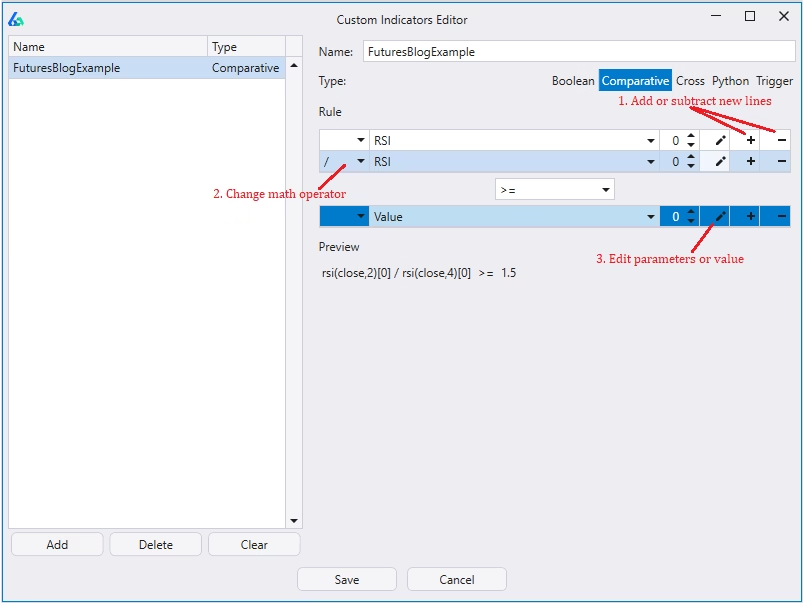
5,000+ pre-built signals not enough? Add your own. The drag-and-drop Visual Signal Editor requires no code. Or use Python — pull in any library and pass your custom signals directly into the Build Alpha strategy engine.
You can also build Trigger Signals, where two events must occur within a specific time window. Price closes above the upper Bollinger Band, then falls back to the center band within 10 bars, for example. It's a way to encode more nuanced price behavior that simple indicator crossovers can't capture.
Advanced Optimization
Build Alpha goes beyond standard parameter optimization. You can incorporate noise-adjusted data into the optimization process, which helps surface parameter settings that hold up to data variation rather than ones that just look good on historical data. A 3D surface plot lets you visualize parameter sensitivity across the range — and you can generate trading code for any specific point on that plot with one click.
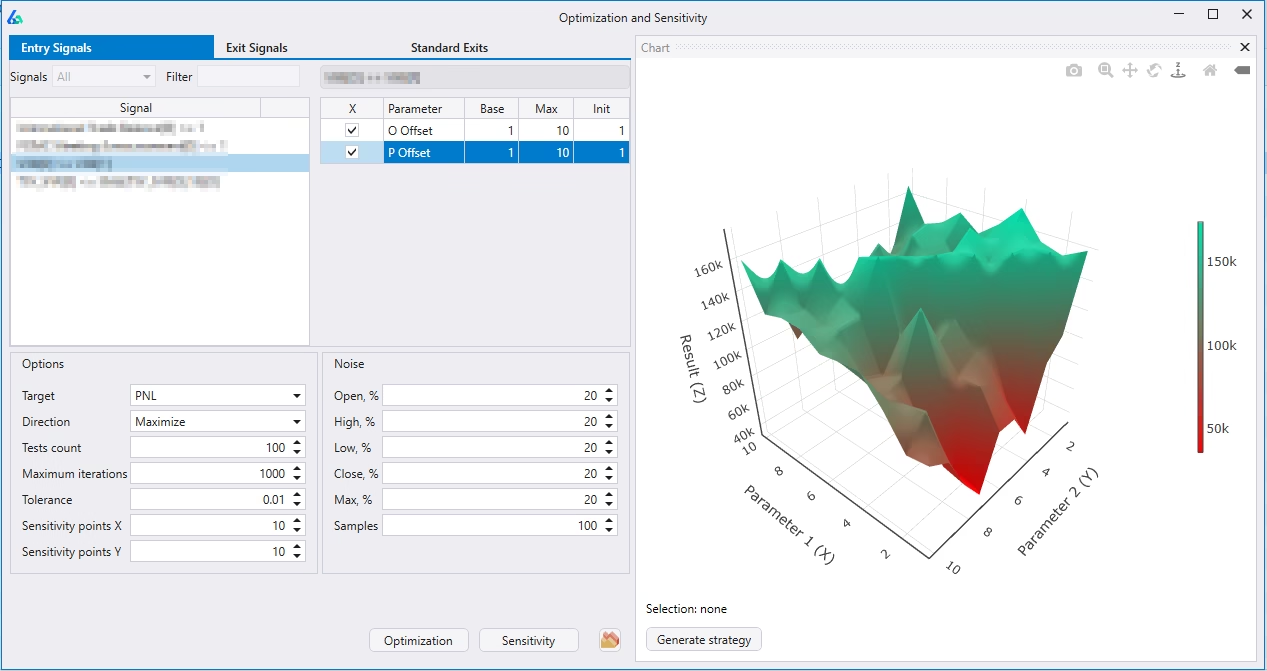
Live Strategy Monitoring
Connect Build Alpha directly to brokers and data providers to monitor real-time positions, track live P&L, and receive alerts across your entire strategy portfolio. Supported connections include TradeStation, Interactive Brokers, and others. Not ready for full automation? The Daily Position Report gives you a manual execution summary — what to enter, what to exit, current rankings, open P&L, and available funds — all in one place.
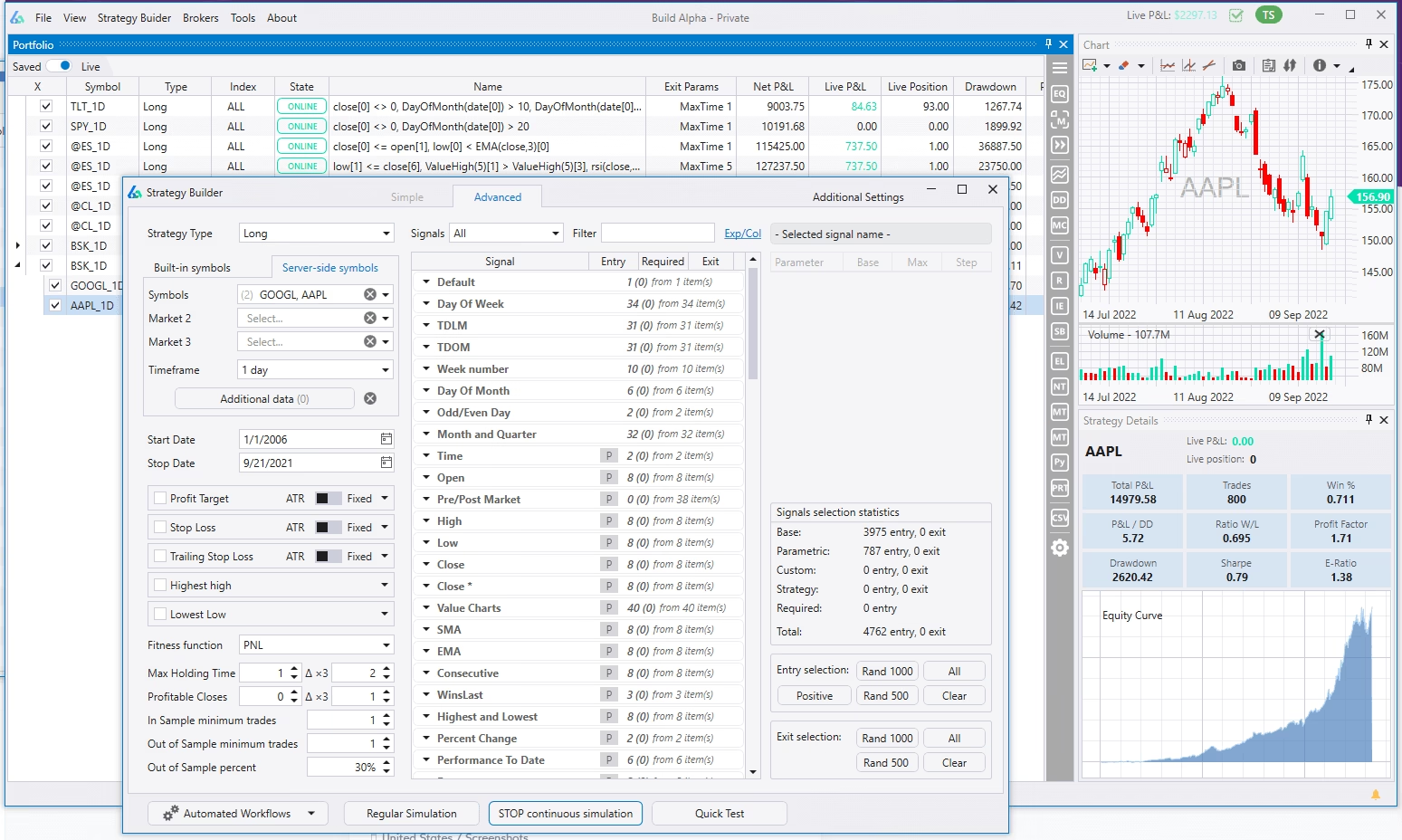
Building Strategies the Old Way vs. the Build Alpha Way
Let me give you a concrete comparison.
Traditional Strategy Development:
- Come up with an idea (30 minutes)
- Code the strategy in EasyLanguage or Python (2-4 hours, including debugging)
- Run initial backtest (15 minutes)
- Optimize parameters (1-2 hours)
- Set up out-of-sample testing (30 minutes)
- Run manual validation tests (2-3 hours)
- Document results (30 minutes)
Total time: 7-11 hours for ONE strategy idea
Build Alpha 3.0 Workflow:
- Define market and timeframe (2 minutes)
- Select entry/exit signals (3 minutes)
- Set Automated Workflow filters (5 minutes)
- Hit simulate—Build Alpha tests millions of variations (10-30 minutes)
- Review filtered results (20 minutes)
- Export code for top candidates (2 minutes)
Total time: 45-60 minutes for THOUSANDS of strategy variations
That's not a typo. Build Alpha doesn't just speed up your process—it fundamentally changes what's possible. You're testing more ideas, more thoroughly, in a fraction of the time.
Does Build Alpha Actually Work?
Yes. I'm trading live strategies I built with it.
But please keep in mind. Build Alpha is a tool, not a magic button. I've been using it for several years, generated thousands of strategy variations, put candidates through rigorous validation, and yes — several of those strategies are in my live portfolio right now. That didn't happen overnight, and it wasn't as simple as clicking "generate" and waiting for profitable systems to appear.
Here's what Build Alpha will do: test ideas exponentially faster than hand-coding, validate systems more thoroughly than most traders ever attempt, help you avoid curve-fitting traps, build diversified portfolios with proper correlation analysis, and export production-ready code instantly.
Here's what it won't do: automatically build a profitable portfolio while you sleep, replace the need to understand systematic trading principles, or compensate for poor risk management and unrealistic expectations.
This is also true for the old way of building trading systems. Learning EasyLanguage doesn't automatically make you a profitable trader. Lots of people think it does but knowing how to code is different from knowing how to build winning systems. Same logic applies here.
Build Alpha is a Formula One race car. You still need to know how to drive.
That said, the validation suite alone — Noise Test, Variance Test, Vs. Random — justifies the investment, in my opinion. These tests are what separate strategies with real edge from strategies that just got lucky on historical data. Most retail traders never validate this thoroughly, and Build Alpha makes it accessible to anyone.
And with 3.0's Automated Workflows eliminating the manual validation grind, the one friction point that consistently slowed down my own process is finally gone. That's the main reason I'm genuinely excited to upgrade.
Strategies Built With Build Alpha
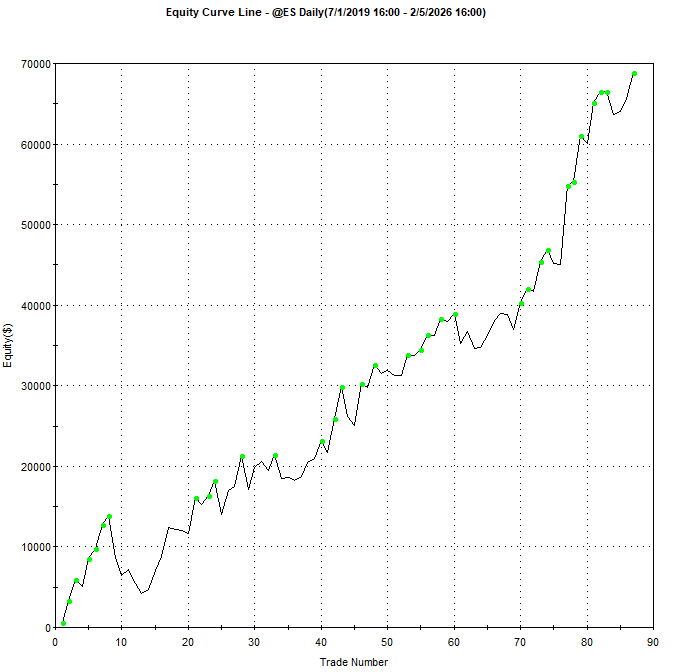
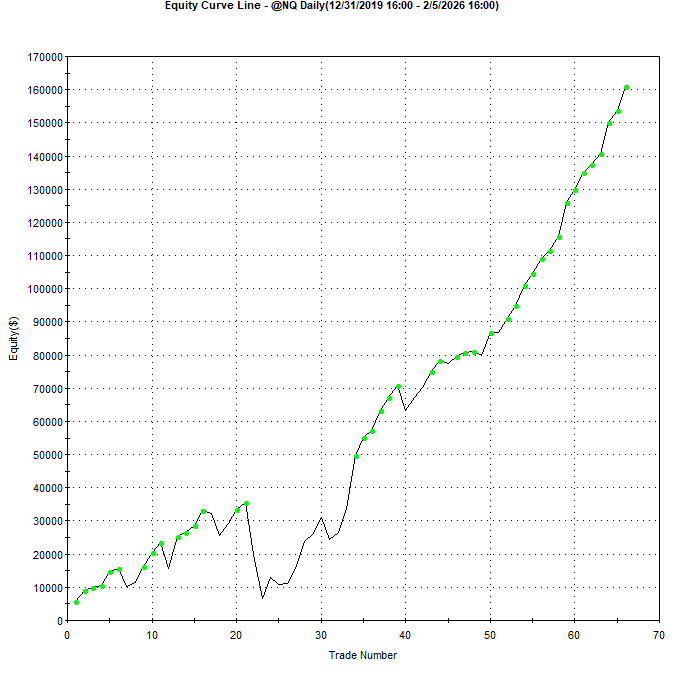
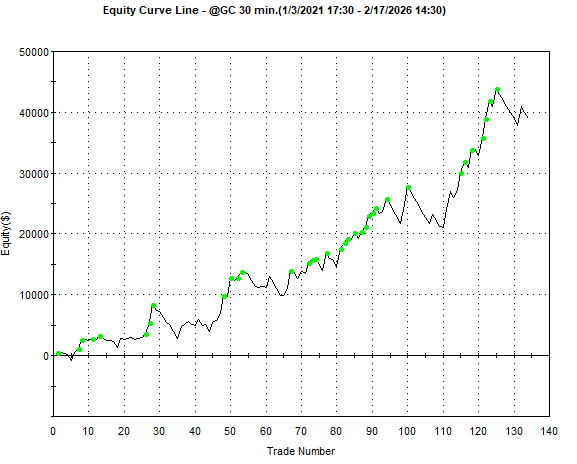
The following strategies were all created with Build Alpha and the equity curve are all out-of-sample. The first strategy is a short term trend following strategy on @ES.
The next strategy is a short term trend following strategy on @NQ.
This final strategy is a short term breakout strategy on @GC.
Who Should Use Build Alpha?
Build Alpha 3.0 is the right tool for a few different types of traders.
If you want to build automated systems but don't want to spend 6-12 months learning EasyLanguage or Python, Build Alpha removes that barrier entirely. No coding required to get production-ready strategies out the other end.
If you can already code but want to speed up your research process, Build Alpha still makes sense. Why spend hours building every strategy manually when you can rapidly test concepts and refine the winners in code afterward?
If strategy development has felt overwhelming — too many variables, no clear validation process, no structure — Build Alpha provides the workflow and the guardrails. The robustness tests alone give you a framework for deciding what's worth trading and what's just curve-fitted noise.
If you tried an earlier version and found the manual validation process tedious, 3.0's Automated Workflows fix exactly that. It was my biggest frustration with the software for years. It's gone now.
And if you simply value your time, the math is hard to argue with. Testing 1,000 strategy variations in an hour versus spending months hand-coding each one isn't a minor efficiency gain — it's a fundamentally different way of working.
Build Alpha 3.0 is a one-time purchase of approximately $2,000 — no subscription. For serious strategy developers, it's one of the better investments you can make in your trading infrastructure.
Ready to Accelerate Your Strategy Development?
Build Alpha 3.0 represents a significant evolution in no-code strategy development. The addition of Automated Workflows and Portfolio Suggest alone makes this a must-see upgrade for anyone serious about building robust trading systems.
If you're still manually coding every strategy idea, running validation tests one at a time, and manually optimizing portfolio allocation, you may want to take a look at Build Alpha 3.0.
I've been using Build Alpha for years, and just digging into 3.0. But I was so excited about some of the new features I had to get his article out ASAP. The Automated Workflows feature solves the biggest pain point I experienced with earlier versions, and Portfolio Suggest adds AI-powered optimization that wasn't possible before.
Again, do I expect Build Alpha 3.0 to replace my development process completely? I'm not sure at this point. I'm still getting familiar with all the features. But I’ll be eagerly testing and using it in 2026. If and when that day arrives, I’ll let you know.
Learn more about Build Alpha 3.0 and see detailed feature demonstrations at the Build Alpha website.
Technology moves fast. Your strategy development process should too.
This is a very helpful article – I recently upgraded to BuildAlpha 3 and there’s a lot of new features to check out – this article is extremely helpful in making sense of it all. Thanks!
Thanks. Yes, lots to learn!
How do the Robustness tests: Noise Test, Vs. Random test and Variance Testing interact with Walk-forward Analysis? Can they be done simultaneously?
The robustness checks are run independently of the Walk Forward Analysis.
Thanks for this article, I’m just starting trading systematically and a software like this one seems to be something that could make a difference! I’ll take a look a that.
Jeff, is there a discount code for BuildApha 3.0?
Not that I’m aware of.
Tried extracting and running EL code for the built-in NQ strategy. As I recall, the exits don’t work. They’re just a bunch of boilerplate that’s not enabled.
It might have been the ES strategy. Disinclined to go back and check.